Why I moved my portfolio from Next.js to Astro
I always wanted my portfolio to be a place to write. Astro let me do that without building a backend first.

When I built my old portfolio, I had one thing in mind: one day, I wanted to start writing articles on my website.
I had no experience writing technical articles, and honestly, I had no idea where to start. But I knew I wanted to do it eventually, so I made sure the page was already part of the site.
My portfolio was built with Next.js, Tailwind CSS, and some cool animations using Motion for React. The problem? Turning that empty articles page into something useful meant I needed a way to manage and publish content.
That meant building a backend.
It wasn’t impossible. I could have used Django, which I have some experience with. I could also have gone with Supabase and Drizzle, or a headless CMS like Strapi or Directus. All of these were viable options, but they felt like more infrastructure than I needed for a personal portfolio.
And to be clear, I’m not suggesting these tools are bad choices. They just felt like overkill for what I was trying to achieve.
I also didn’t want the additional complexity of managing separate services or configuring third-party integrations just to publish an article. Perhaps that would have made sense down the line, but it wasn’t a direction I wanted to take at the time.
So, I started researching alternatives. Was there a better way to build a portfolio that could also serve as a home for my writing?
Enter Astro
Over the years, I’ve worked with Next.js, plain React, TanStack Router, and TanStack Start, but I hadn’t tried Astro.
Astro first came onto my radar through a colleague, Lewis Kori, a senior software engineer and co-founder of Inflection Studio. He was looking to revamp his own portfolio and had run into a similar challenge.
He wrote about his experience and the reasoning behind his decision to move from Gridsome to Astro in From Gridsome to Astro: Rebuilding My Personal Site for the Next Phase.
His recommendation was simple: why don’t we use Astro for this one?
I’d never used Astro before, so this was new territory for me. But come on, who doesn’t love a good challenge?
More importantly, it was an opportunity to learn something new while working on a real project. I’d worked with JavaScript frameworks before, and Astro had documentation I could follow. I wasn’t starting from scratch; I was building on what I already knew.
As I worked through the documentation, I began to understand why Astro made sense for his portfolio. Then it clicked: this was exactly what I’d been looking for.
Why Astro made sense for my portfolio
There were a few things about Astro that stood out to me, but the biggest one was its content-first approach.
Content without a backend
Astro allowed me to write articles in Markdown and organise them using content collections. I didn’t need to build a backend or introduce a database just to publish blog posts.
For a portfolio where I wanted to focus on writing rather than managing infrastructure, this was a big win.
Type safety with content collections
Astro’s content collections also work well with TypeScript and Zod, making it easier to define the structure of my content and validate it.
This article is a Markdown file, and the top of it looks like this:
---title: Why I moved my portfolio from Next.js to Astrotopic: Astrodate: 2026-10-22readTime: 7---The notebook collection describes what every article must have (simplified here):
const notebook = defineCollection({ loader: glob({ pattern: "**/*.md", base: "./src/content/notebook" }), schema: z.object({ title: z.string(), topic: z.string(), date: z.coerce.date(), readTime: z.number().int().positive(), }),});Instead of discovering that I’d forgotten a required field somewhere down the line, I could define what an article needed and catch missing or incorrectly typed data earlier in development. If I leave out the read time or mistype the date, the build stops and names the file and the field.
It’s a small thing, but these are the kinds of details that make a development experience enjoyable.
Framework flexibility
Another thing I found interesting was Astro’s framework-agnostic approach. I could use React for interactive components and even bring in other supported UI frameworks, such as Vue, within the same project.
I didn’t actually need this flexibility for my portfolio, but knowing it was there was intriguing. I liked that I could introduce the right tool for a particular component without having to commit the entire site to one UI framework.
Less client-side JavaScript
Astro also prioritises rendering content with as little client-side JavaScript as possible by default. For a portfolio that is largely content-driven, that was another compelling reason to make the switch.
Less unnecessary JavaScript can mean less work for the browser, which can contribute to faster page loads and a better user experience.
Of course, performance isn’t determined by the framework alone. Images, fonts, third-party scripts, and the way a site is built all matter. But Astro gave me a good starting point for keeping things lean.
And because this was a portfolio with articles at its core, that approach made a lot of sense.
Seeing it come together
By the time we finished working on Lewis’s portfolio, I was convinced. If Astro could work this well for his project, I wanted to use it for mine, too.
So, I spun up a new project and started rebuilding my portfolio.
Moving away from Next.js was a deliberate choice, not a statement that Next.js is a bad framework or that Astro is inherently better. Next.js is excellent for many use cases, and I’d continue to consider it where it makes sense.
For this particular project, though, my priorities were different. I wanted a portfolio that could showcase my work, give me a place to write, and let me manage content without introducing unnecessary complexity.
Astro checked those boxes.
How the two compare
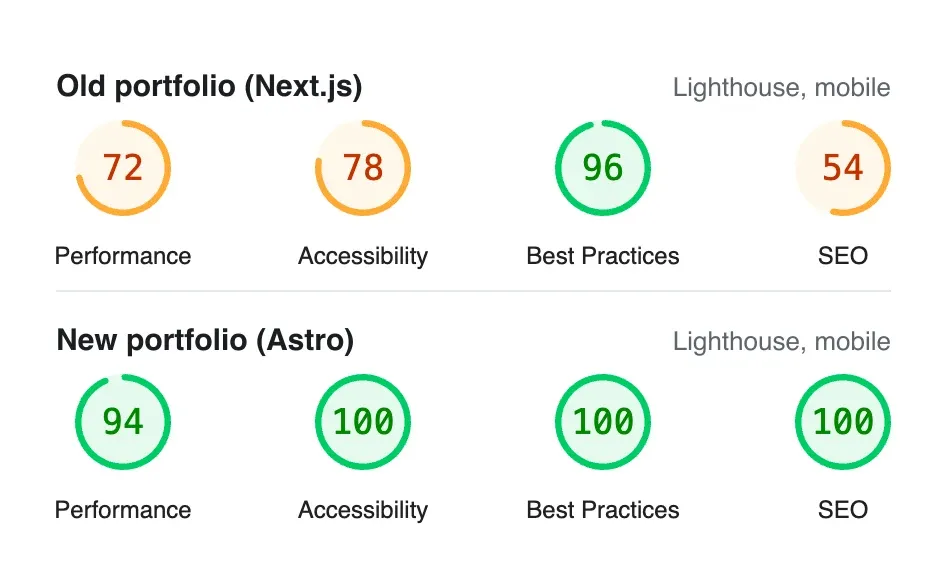
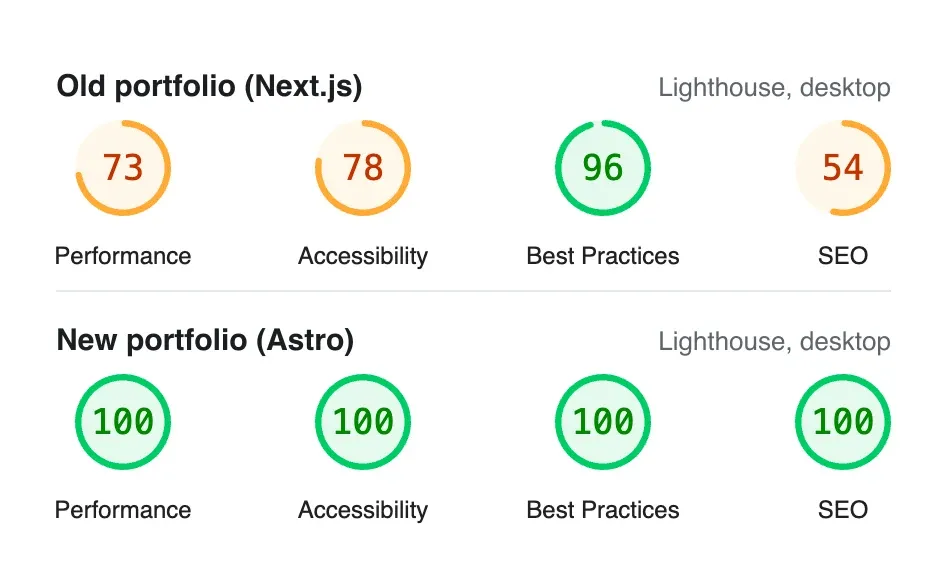
I wanted to see whether any of this showed up in the numbers, so I ran Lighthouse, the engine behind Google’s PageSpeed Insights, against both sites: my old portfolio, which is still deployed, and this one. Each got three runs on Lighthouse’s mobile settings and three on desktop; the scores below are from the middle run.
| Mobile | Old (Next.js) | New (Astro) |
|---|---|---|
| JavaScript sent | 304 KB | 67 KB |
| Total Blocking Time | 235 ms | 25 ms |
| Cumulative Layout Shift | 0.37 | 0 |
| First Contentful Paint | 1.4 s | 1.3 s |
| Largest Contentful Paint | 2.0 s | 2.4 s |
The biggest difference is the JavaScript: 67 KB instead of 304 KB, and almost no time where the page is too busy to respond. That’s the part Astro made easy. Pages ship as HTML, and only the interactive bits bring their own scripts.
Not every number moved because of Astro, though.
The accessibility gap came from my old code: icon buttons and links without labels, some low-contrast text, and a few misused ARIA attributes. I fixed those habits in the rebuild, and I could have fixed them in Next.js too. The SEO score isn’t a fair comparison at all: the old site now lives on a Vercel deployment address, which tells search engines not to index it, and Lighthouse marks that down.
The first version of this site also didn’t score 94 on mobile. When I first measured it, it sat between 69 and 74. The hero text waited for the animation library to load before it appeared, the fonts came from a third-party stylesheet that held up the first paint, and phones downloaded images sized for a desktop screen. Fixing those three things is what got it into the 90s.
That’s what I meant earlier about performance not coming from the framework alone. Astro gave me a good starting point, and the rest was still up to me. The old site even shows its largest image a little sooner on mobile, so there’s still room to improve.
These are lab results from my machine, not data from real visitors, but they point the same way.
The new portfolio is here
After putting it off for years, I finally have a setup that makes writing articles feel much more straightforward. No backend to build just for blog posts, no additional content service to manage, and no excuse to keep postponing the writing.
The new portfolio is live, and you’re reading this on it.
It also features a Polaroid-inspired design, with portraits arranged to look like photographs hanging on a wall. But the thinking behind that design, and how I eventually settled on it, is a story for another day.
For now, I’m happy to have a portfolio that not only showcases what I do but also gives me a place to share what I learn along the way.
And this article? It’s a start.